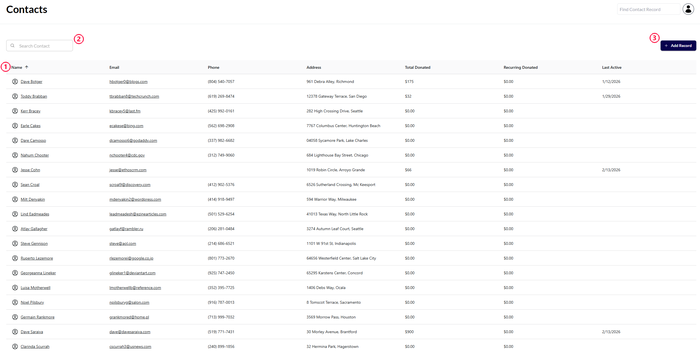
The main contacts view is where you’ll find a complete listing of all constituents in your database.
By default, records will be organized in alphabetical order, by last name, but you can click on the “Name” title at the top of the column (1) to change the sorting.
The first click will switch to reverse alphabetical order, by last name. A second click will change the listing to order by when the records were added to the database (oldest added record first), and finally a third click will reset the order back to the original alphabetical by last name.
If you are looking for a specific record, you can use the “search contact” field found in the top left hand corner of the page (2). As you type into this field the results will automatically filter the table below instantly.
The add record button (3) will launch a pop-up window that will allow you to create a new record.
Record Types
There are several different types of records you can create in your database, and we colour-code them to make it easy to see which is which:
Individual Records
The most common type of record in the system tracks an individual constituent in the system. These are labeled white in the main contacts view
Organizational Records
These are for tracking organizations. Often used for tracking another charity or business that is connected to you in some way. They function almost identically to individual records, except instead of a first name and last name, they only have a single organization name field.
These records are labeled green in the main contacts view
Household Records
These records are designed to allow you to consolidate donors that live in the same household, connecting them to streamline communications but also allowing you to track their individual activity with your organization.
Households are highlighted in blue in the main contacts view and will also display the records that are part of the household indented directly below the household name.
Change Default Sorting
Filter For Specific Constituent
Add New Constituent
Different Record Types